Edinburgh tourist tax automation, without paying for Zapier
Edinburgh's tourist tax started on 24 July 2026 and the first return is due in October. I wanted every booking and every cancellation to land in a spreadsheet on its own, using a free Zapier account and Lodgify's webhooks.
Edinburgh now has a tourist tax. The Council calls it the Edinburgh Visitor Levy, and everyone else calls it the Edinburgh tourist tax. It’s 5% of the accommodation cost, charged on the first five nights of a stay, for stays starting on or after 24 July 2026.
The host collects it. The host works out what’s owed every quarter, files a return and pays the Council. The host keeps 2% of the levy for the trouble.
I’ve run The Garden Rooms for thirteen years. Bookings come in through Booking.com and my own website, and Lodgify sits in the middle as the channel manager. Lodgify knows about every booking. It doesn’t know anything about the levy.
So I built the levy part myself.
The automation, step by step
Lodgify can send a webhook every time something happens to a booking: one message when a booking is made, another when it’s cancelled. Each one carries the guest, the dates, the number of nights, the channel and the room rate.
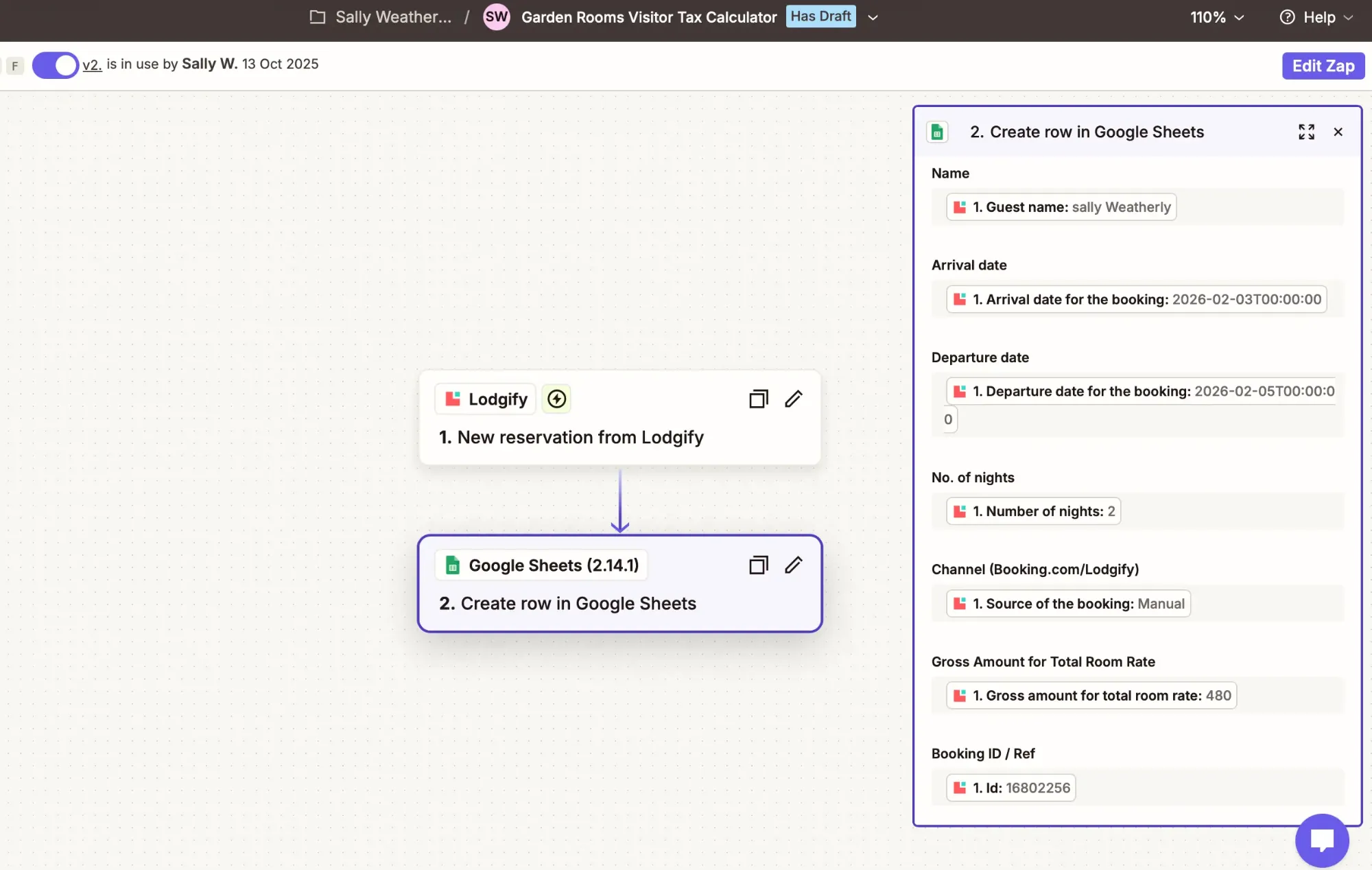
Zapier listens for those messages and writes each one as a new row in a Google Sheet. The sheet does the rest:
- works out the nightly rate and caps the stay at five nights
- calculates the levy, the 2% of it I keep and the amount I pay the Council
- decides whether each booking counts at all
- adds it all up by the Council’s quarters, with the submission and payment deadlines alongside
Nobody types anything in. A booking made at midnight is on the return by morning.
Pro was the only way to update a row
The obvious way to handle a cancellation is to find the booking’s row and mark it cancelled. Zapier can do that. Lookup and update steps need a paid plan, though, and Zapier said so in a yellow banner as soon as I tried to add one.
A free account can only add rows. So that’s all it does.
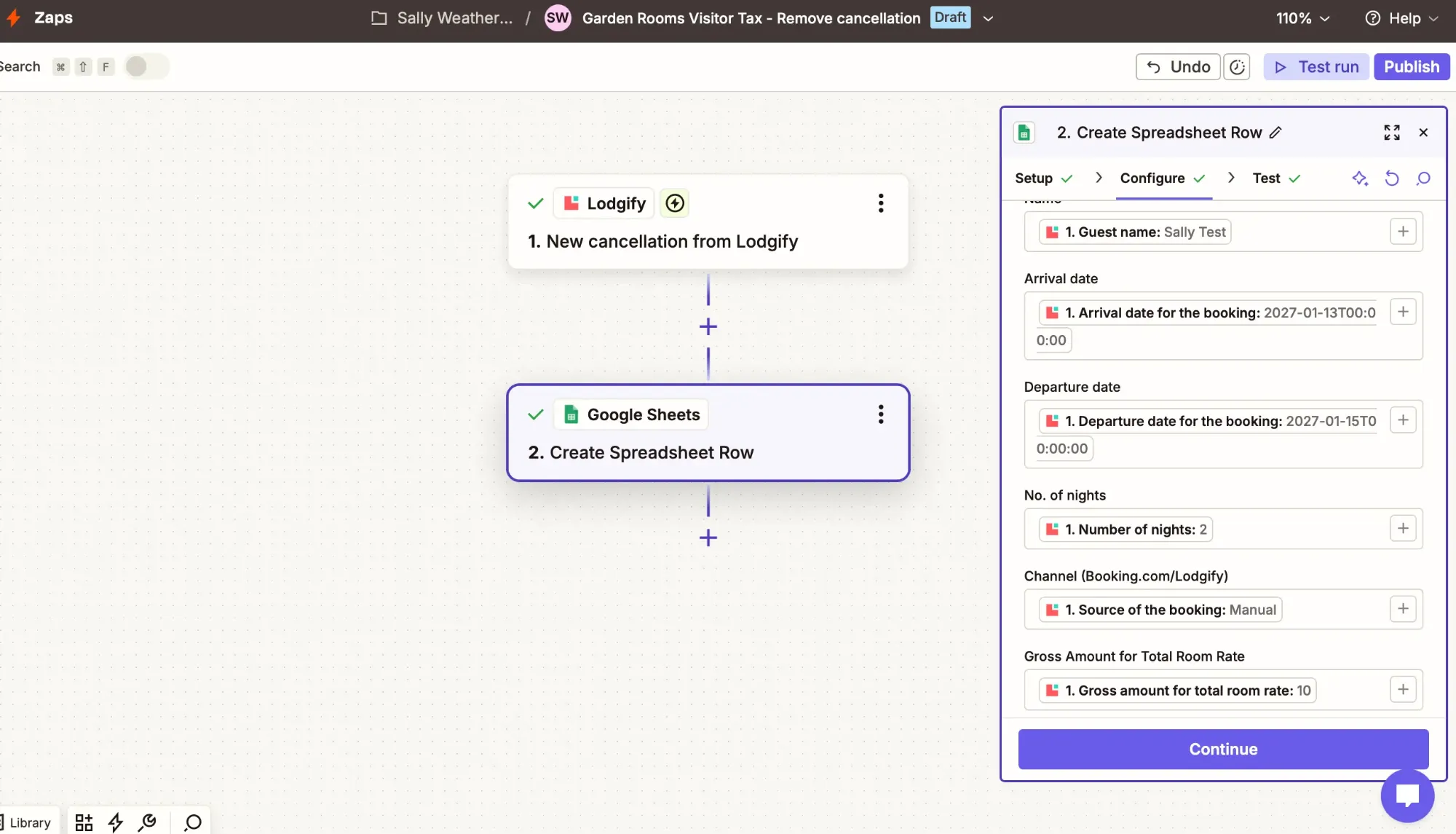
When a booking is cancelled, the cancellation gets its own new row carrying the same booking ID. The spreadsheet looks down the ID column, finds both rows and treats that booking as cancelled. When a booking is amended, the new version becomes another row, and only the newest row for each ID counts. Nothing is ever deleted or overwritten.
That turned out better than what I was trying to buy. The Council expects records to be kept for five years, and an append-only sheet is a complete history of every booking, every change and every cancellation, in the order they happened.
Zapier only works from today
A new Zap only sees what happens after you switch it on. Twelve cancellations had already happened since the levy started, so I exported them from Lodgify and added them to the bottom of the sheet by hand, in the same shape as everything else. Two of them matched bookings that would otherwise have been on the return.
The rules the Council wrote down
I read the Council’s guide for accommodation providers end to end before trusting any of it, and three things changed the spreadsheet:
- A stay belongs to the quarter the guest checks out. A stay over the end of September goes on the October to December return.
- A stay that starts before 24 July isn’t liable at all, even if most of it is after. One of my guests arrived on 23 July. I’d been charging them for one night. I shouldn’t have been charging them for any.
- If the guest never arrives, there’s no levy. Cancelled stays stay off the return, and anything collected in advance goes back to the guest.
Booking.com taught me a fourth. The tax figure Lodgify reports for a Booking.com reservation is about 26% of the room rate, because it includes VAT. Map that across as “levy collected” and the sheet would be wrong by a factor of five. For direct bookings the figure is the levy alone, so the sheet uses it there and calculates it for Booking.com.
Two checks for numbers that are wrong
The formulas were the easy part. What worries me is a number that’s wrong and looks fine.
So the sheet checks two things that should never happen. Two live stays under the same name with overlapping dates are highlighted amber. The first time it ran, it found a guest booked twice for the same four nights next September, once directly and once through Booking.com.
And once a return is filed, I type in what I submitted. If a late cancellation or an amendment changes that quarter afterwards, the difference turns red.
Four hours, spread over a year
This automation was built over twelve months, but I’ve probably spent four hours on it in total. I don’t know yet whether it’s a time-saver. I’m happy to keep experimenting with automating it.
I’ve now filed my first return. The hardest part wasn’t the spreadsheet, it was transferring the money. I’d like to see it turn up somewhere I’ll notice: Princes Street, the bins, the pavements.
Build it yourself
You don’t need Lodgify or Edinburgh for this. Any channel manager that Zapier can listen to will do, and any percentage-based tourist tax fits the same shape. You need a free Zapier account and a Google Sheet.
1. Set up the sheet. One tab called Levy with these headers in row 1: Name, Arrival, Departure, Nights, Channel, Room rate, Booking ID, Status. Zapier writes into these columns and nothing else.
2. Put the rules in their own tab. A tab called Settings, with the levy rate in B1 (5%), the share you keep in B2 (2%), the start date in B3 (24/07/2026) and the night cap in B4 (5). If the rules change, you change four cells, not forty formulas.
3. Zap one: new bookings. Trigger: new booking in your channel manager. Action: Google Sheets, Create Spreadsheet Row. Map guest name, arrival, departure, nights, source, room rate and the booking ID.
4. Zap two: cancellations. Trigger: booking cancelled. Action: Create Spreadsheet Row again, with the same fields, plus the booking status in the Status column. Map the ID from exactly the same field you used in Zap one. Lodgify sends more than one number that looks like a booking ID, and if the two Zaps pick different ones, nothing will ever match.
5. Zap three, if your channel manager offers it: amendments. Same again, triggered by a booking change. The newest row for each ID is the one that counts.
6. Add the formulas to the header row. Each formula goes in row 1 and fills the whole column, so every row Zapier adds is calculated automatically. In column I:
={"Levy status"; ARRAYFORMULA(IF(A2:A="",, IF(COUNTIFS(G2:G, G2:G, H2:H, "*cancel*") + COUNTIFS(G2:G, G2:G, H2:H, "*declin*") > 0, "Cancelled", IF(ROW(G2:G) < IFERROR(XLOOKUP(G2:G, G2:G, ROW(G2:G), , 0, -1), 0), "Superseded", IF(B2:B < Settings!B3, "Before levy start", "Liable")))))}That marks a booking Cancelled if any row with its ID is a cancellation, Superseded if a newer row with its ID exists further down, and otherwise checks the start date.
And in column J:
={"Levy"; ARRAYFORMULA(IF(A2:A="",, IF(I2:I="Liable", F2:F/D2:D * IF(D2:D > Settings!B4, Settings!B4, D2:D) * Settings!B1, 0)))}7. Add a returns tab. One row per quarter, with the start date in column A and the end date in column B. The levy for each quarter counts stays by checkout date:
=SUMIFS(Levy!J:J, Levy!I:I, "Liable", Levy!C:C, ">="&A2, Levy!C:C, "<="&B2)Your share is that total times Settings!B2. The Council gets the rest.
8. Fill in the history. Your Zaps only see what happens after you turn them on. Export earlier bookings and cancellations from your channel manager and paste them in underneath, in the same columns.
9. Test it. Make a test booking, amend it, then cancel it. You should end up with rows that share one ID and are all marked Cancelled. Then check one quarter’s total against the Council’s own levy calculator before you file anything.